Semana 4
Esta semanas continuaremos explorando el API de FreeRTOS.
Objetivos
- Utilizar mecanismos de comunicación entre tareas.
- Emplear los servicios ofrecidos por los temporizadores del sistema operativo para controlar acciones en el tiempo.
Ejercicios con el API de FreeRTOS
Para realizar los siguientes ejercicio es necesario tener a la mano dos documentos:
- Tutorial oficial.
- La implementación de Espressif. ESP-FREERTOS.
Ejericio 1: comunicación entre tareas
Las colas o Queues son uno de los mecanismos de comunicación de FreeRTOS. Estas permiten comunicar tareas, tareas con interrupciones e interrupiones con tareas.
Las colcas almacenan una cantidad finita de items todos ellos del mismo tamaño. La longitud de la cola es la cantidad máxima de items que puede almacenar. Al momento de crear la cola se define el tamaño de los items y la longitud de la cola.
Las colas se utilizan como estructuras de datos FIFO (First In First Out). Los datos se escriben al final de la cola (tail) y se remueven del frente (head). Es posible escribir al frente de la cola para modificar datos que ya están presentes.
La siguiente figura ilustra cómo funciona una cola:
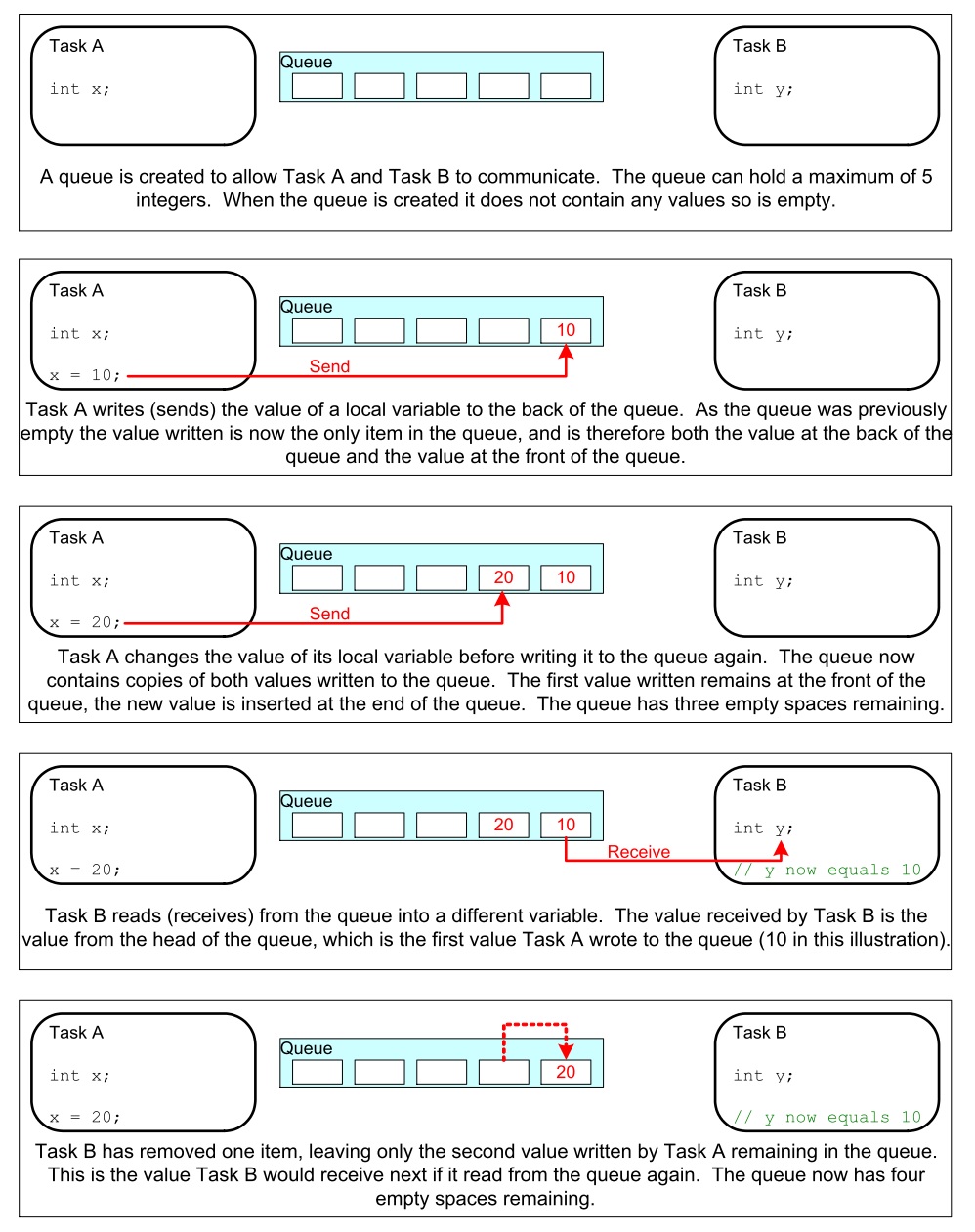
Los datos que se almacenan en la cola pueden comportarse por valor (copia byte por byte) o por referencia (se copia la dirección del puntero donde están los datos). El primer método es más costoso en términos de memoria, pero permite desacoplar mejor las tareas, haciendo más simple el manejo de la información.
Otras características a considerar:
Es usual que una cola tenga múltiples escritores y sólo un lector. Aún así, es posible usarlas con otros esquemas.
Una tarea lectora se bloqueará si no hay datos en la cola. Es posible especificar el tiempo que durará bloqueada. Si otra tarea o una interrupción envía datos a la cola, la tarea pasará automáticamente al estado lista para ejecución y por tanto será candidata a tener una CPU cuando el scheduler así lo determine.
Las tareas pueden bloquerse, y especificar también tiempos de bloqueo, al escribir una cola. Esto ocurre cuando no hay más espacio disponible.
Varias tareas escritoras pueden bloquearse al esperar espacio en una cola. Cuando el espacio esté disponible, la tarea de más alta prioridad será desbloqueada y puesta en lista para correr. Si todas las tareas tienen la misma prioridad, la tarea que lleve más tiempo esperando desbloqueada y puesta lista para correr.
API para crear una cola
QueueHandle_t xQueueCreate( UBaseType_t uxQueueLength, UBaseType_t uxItemSize );
Actividades:
- Realizar el ejemplo 10 del Tutorial oficial.
- Realizar el ejemplo 11.
Recuerde que en ambas actividades es de esperar un comportamiento diferente gracias a los dos CPUs. De igual manera, es necesario adaptar el código pues no tenemos acceso directo a la función main. Pregunta juanito: ¿Cómo adapto el código? Mire los ejemplos anteriores y compárelos con los códigos de la semana 3.
Ejericio 2: verificación del ejemplo 10
Una vez realizado el ejercicio 1 compare su respuesta con el siguiente código. Analice y concluya:
1 2 3 4 5 6 7 8 9 10 11 12 13 14 15 16 17 18 19 20 21 22 23 24 25 26 27 28 29 30 31 32 33 34 35 36 37 38 39 40 41 42 43 44 45 46 47 48 49 50 51 52 53 54 55 56 57 58 59 60 61 62 63 64 65 66 67 68 69 70 71 72 73 74 75 76 77 78 79 80 81 82 83 84 85 86 87 88 89 90 91 92 93 94 95 96 97 98 99 100 101 102 103 104 105 106 107 108 109 110 111 112 113 114 115 | #include <stdio.h>
#include "freertos/FreeRTOS.h"
#include "freertos/task.h"
#include "freertos/queue.h"
/*-----------------------------------------------------------*/
/* Declare a variable of type QueueHandle_t. This is used to store the handle
to the queue that is accessed by all three tasks. */
QueueHandle_t xQueue;
static void vSenderTask( void *pvParameters )
{
int32_t lValueToSend;
BaseType_t xStatus;
/* Two instances of this task are created so the value that is sent to the
queue is passed in via the task parameter - this way each instance can use
a different value. The queue was created to hold values of type int32_t,
so cast the parameter to the required type. */
lValueToSend = ( int32_t ) pvParameters;
/* As per most tasks, this task is implemented within an infinite loop. */
for( ;; )
{
/* Send the value to the queue.
The first parameter is the queue to which data is being sent.
The second parameter is the address of the data to be sent, in this case
the address of lValueToSend.
The third parameter is the Block time – the time the task should be kept
in the Blocked state to wait for space to become available on the queue.
*/
printf( "Sender(%d). stack: %d\r\n",lValueToSend,uxTaskGetStackHighWaterMark(NULL));
xStatus = xQueueSendToBack( xQueue, &lValueToSend, 0 );
if( xStatus != pdPASS )
{
/* The send operation could not complete because the queue was full - */
printf( "Could not send to the queue.\r\n" );
}
}
}
static void vReceiverTask( void *pvParameters )
{
/* Declare the variable that will hold the values received from the queue. */
int32_t lReceivedValue;
BaseType_t xStatus;
const TickType_t xTicksToWait = pdMS_TO_TICKS( 100 );
/* This task is also defined within an infinite loop. */
for( ;; )
{
printf( "There are (%d) messages waiting\r\n",uxQueueMessagesWaiting( xQueue ));
/* Receive data from the queue.
The first parameter is the queue from which data is to be received.
The second parameter is the buffer into which the received data will be
placed. In this case the buffer is simply the address of a variable that
has the required size to hold the received data.
The last parameter is the block time – the maximum amount of time that the
task will remain in the Blocked state to wait for data to be available */
printf("Receiver stack: %d\r\n",uxTaskGetStackHighWaterMark(NULL));
xStatus = xQueueReceive( xQueue, &lReceivedValue, xTicksToWait );
if( xStatus == pdPASS )
{
/* Data was successfully received from the queue, print out the received
value. */
printf( "Received = %d\r\n", lReceivedValue );
}
else
{
/* Data was not received from the queue even after waiting for 100ms.
This must be an error as the sending tasks are free running and will be
continuously writing to the queue. */
printf( "After 100ms blocking time, could not receive from the queue.\r\n" );
}
}
}
void app_main()
{
/* The queue is created to hold a maximum of 5 values, each of which is
large enough to hold a variable of type int32_t. */
xQueue = xQueueCreate( 5, sizeof( int32_t ) );
if( xQueue != NULL )
{
/* Create the task that will read from the queue. The task is created with
priority 2, so above the priority of the sender tasks. */
xTaskCreate( vReceiverTask, "Receiver", 2048, NULL, 2, NULL );
/* Create two instances of the task that will send to the queue. The task
parameter is used to pass the value that the task will write to the queue,
so one task will continuously write 100 to the queue while the other task
will continuously write 200 to the queue. Both tasks are created at
priority 1. */
xTaskCreate( vSenderTask, "Sender1", 2048, ( void * ) 100, 1, NULL );
xTaskCreate( vSenderTask, "Sender2", 2048, ( void * ) 200, 1, NULL );
}
else
{
/* The queue could not be created. */
}
}
|
Al ejecutar el código
There are (0) messages waiting
Sender(100). stack: 1756
Receiver stack: 512
Sender(200). stack: 1752
Received = 100
Sender(100). stack: 588
There are (1) messages waiting
Sender(200). stack: 584
Receiver stack: 512
Received = 200
There are (2) messages waiting
Sender(200). stack: 584
Receiver stack: 512
Received = 100
There are (2) messages waiting
Sender(200). stack: 584
Receiver stack: 512
Received = 200
There are (2) messages waiting
Sender(200). stack: 584
Receiver stack: 512
Received = 200
There are (2) messages waiting
Sender(200). stack: 584
Receiver stack: 512
Received = 200
There are (2) messages waiting
Sender(200). stack: 520
Receiver stack: 512
Received = 200
Luego de un instante aquí hay otra captura de la salida
There are (2) messages waiting
Sender(100). stack: 588
Receiver stack: 512
Received = 200
There are (2) messages waiting
Sender(100). stack: 588
Receiver stack: 512
Received = 200
There are (2) messages waiting
Sender(100). stack: 588
Receiver stack: 512
Received = 100
There are (2) messages waiting
Sender(100). stack: 588
Receiver stack: 512
Received = 100
There are (2) messages waiting
Sender(100). stack: 588
Receiver stack: 512
Received = 100
There are (2) messages waiting
Sender(100). stack: 524
Receiver stack: 512
Received = 100
There are (2) messages waiting
Note cómo la ejecución de las tarea que envían se alterna en el tiempo.
Ejericio 3: verificación del ejemplo 11
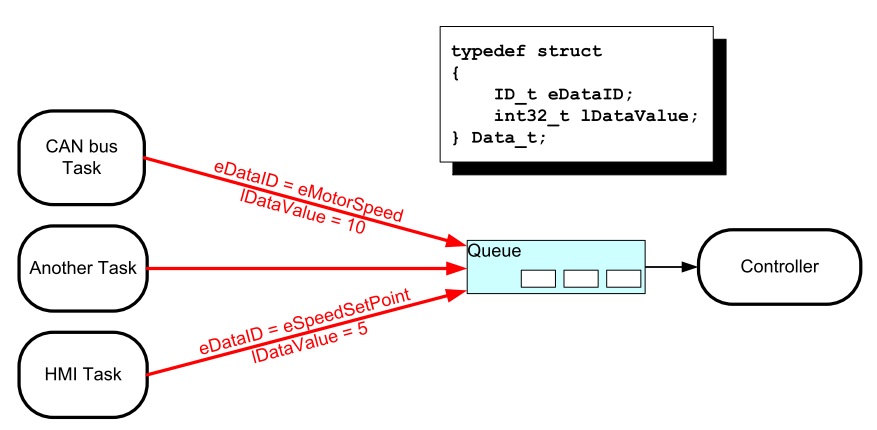
En el ejemplo 11 del tutorial, una tarea lectora recibe mensajes de varias tareas escritoras. Todos los mensajes llegan a la misma cola, por tanto, es necesario establecer una estrategia que permita identificar la fuente de cada mensaje. El escenario que se describe se ilustra en la siguiente figura:
Aquí está el código del ejemplo 11:
1 2 3 4 5 6 7 8 9 10 11 12 13 14 15 16 17 18 19 20 21 22 23 24 25 26 27 28 29 30 31 32 33 34 35 36 37 38 39 40 41 42 43 44 45 46 47 48 49 50 51 52 53 54 55 56 57 58 59 60 61 62 63 64 65 66 67 68 69 70 71 72 73 74 75 76 77 78 79 80 81 82 83 84 85 86 87 88 89 90 91 92 93 94 95 | #include <stdio.h>
#include "freertos/FreeRTOS.h"
#include "freertos/task.h"
#include "freertos/queue.h"
/* The tasks to be created. Two instances are created of the sender task while
only a single instance is created of the receiver task. */
static void vSenderTask( void *pvParameters );
static void vReceiverTask( void *pvParameters );
/* Declare a variable of type QueueHandle_t. This is used to store the queue
that is accessed by all three tasks. */
QueueHandle_t xQueue;
typedef enum
{
eSender1,
eSender2
} DataSource_t;
/* Define the structure type that will be passed on the queue. */
typedef struct
{
uint8_t ucValue;
DataSource_t eDataSource;
} Data_t;
/* Declare two variables of type Data_t that will be passed on the queue. */
static const Data_t xStructsToSend[ 2 ] =
{
{ 100, eSender1 }, /* Used by Sender1. */
{ 200, eSender2 } /* Used by Sender2. */
};
void app_main(void)
{
xQueue = xQueueCreate( 3, sizeof( Data_t ) );
if( xQueue != NULL )
{
xTaskCreate( vSenderTask, "Sender1", 2048, ( void * ) &( xStructsToSend[ 0 ] ), 2, NULL );
xTaskCreate( vSenderTask, "Sender2", 2048, ( void * ) &( xStructsToSend[ 1 ] ), 2, NULL );
xTaskCreate( vReceiverTask, "Receiver", 2048, NULL, 1, NULL );
}
else
{
printf("The queue could not be created.\r\n");
}
}
/*-----------------------------------------------------------*/
static void vSenderTask( void *pvParameters )
{
BaseType_t xStatus;
const TickType_t xTicksToWait = pdMS_TO_TICKS( 100UL );
for( ;; )
{
xStatus = xQueueSendToBack( xQueue, pvParameters, xTicksToWait );
if( xStatus != pdPASS )
{
printf( "After 100ms blocking time, could not send to the queue.\r\n" );
}
}
}
/*-----------------------------------------------------------*/
static void vReceiverTask( void *pvParameters )
{
Data_t xReceivedStructure;
BaseType_t xStatus;
for( ;; )
{
printf( "There are (%d) messages waiting\r\n",uxQueueMessagesWaiting( xQueue ));
xStatus = xQueueReceive( xQueue, &xReceivedStructure, 0 );
if( xStatus == pdPASS )
{
if( xReceivedStructure.eDataSource == eSender1 )
{
printf( "From Sender 1 = %d\r\n", xReceivedStructure.ucValue );
}
else
{
printf( "From Sender 2 = %d\r\n", xReceivedStructure.ucValue );
}
}
else
{
printf( "The queue is empty.\r\n" );
}
}
}
|
Y el resultado es:
There are (3) messages waiting
From Sender 1 = 100
There are (3) messages waiting
From Sender 1 = 100
There are (3) messages waiting
From Sender 1 = 100
There are (3) messages waiting
From Sender 1 = 100
There are (3) messages waiting
From Sender 2 = 200
There are (3) messages waiting
From Sender 1 = 100
There are (3) messages waiting
From Sender 2 = 200
There are (3) messages waiting
From Sender 1 = 100
There are (3) messages waiting
From Sender 2 = 200
There are (3) messages waiting
From Sender 1 = 100
There are (3) messages waiting
From Sender 2 = 200
Analice el resultado. ¿Qué puede concluir?
Ejercicio 4: ¡RETO!
En este ejercicio se requiere resolver el siguiente reto. Debemos comunicar dos tareas. La tarea escritora enviará mensajes de longitud variable. Cada mensaje será una cadena. La tarea lectora deberá imprimir los mensajes recibidos. Por su parte la tarea escritora deberá crear un buffer (sólo uno) con el tamaño apropiado para poder alojar cada mensaje. Los mensajes serán enviados por medio de una cola. Cada mensaje en la cola debe tener un puntero al buffer donde está el mensaje. Tenga presente que el escritor no podrá utilizar el buffer hasta que el lector lea el mensaje y lo imprima. Por tanto es necesario pensar en una estrategia para sincronizar las tareas.
Ejercicio 5: Software Timers
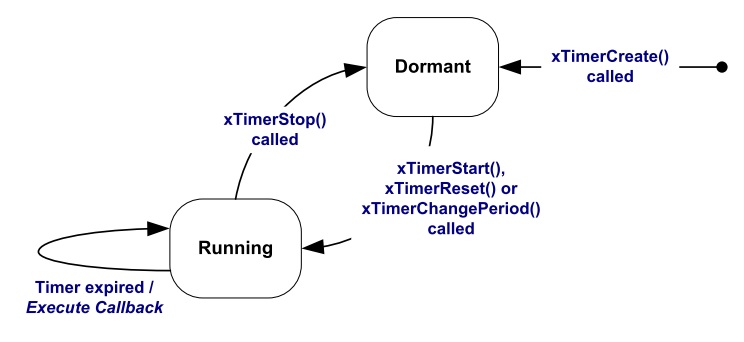
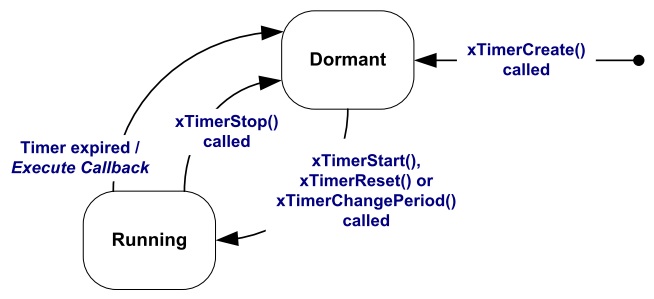
Los software timers se utilizan para programar la ejecución de una función ( callback ) en un instante de tiempo futuro o de manera periódica a una frecuencia fija. Hay dos tipos de software timers: one-shot timer y periódico o auto-reload timer. En el primero, el callback se ejecuta sólo una vez. En el segundo, el callback se llama periódicamente. Un software timer puede estar en uno de dos posibles estados: dormant, no está corriendo y su callback no será ejecutado, running, está corriendo y su callback será ejecutado. La siguiente figura muestra el modelo de funcionamiento de un auto-reload timer:
La siguiente figura muestra el modelos de funcionamiento de un one-shot timer:
Al utilizar los software timers se debe considerar:
Es necesario incluir freertos/timers.h
Declarar el callback usando el siguiente prototipo:
void ATimerCallback( TimerHandle_t xTimer );
Los callback se ejecutan de principio a fin. Deben mantenerse cortos y NUNCA entrar en estado bloqueado.
Los callback ejecutan en el contexto de una tarea que FreeRTOS crea automáticamente al iniciar. Por tanto, no deben hacer llamados a funciones bloqueantes que puedan bloquear la tarea creada por FreeRTOS.
Es posible utilizar funciones como xQueueReceive, pero se debe definir el tiempo de bloqueo en 0.
Todos los software timers se ejecutan en el contexto de una tarea, timer service task, de FreeRTOS que se crea automáticamente cuando el scheduler inicia. El tamaño de su stack y prioridad se definen utilizando menuconfig. Para evitar que la tarea timer service se bloquee no se pueden utilizar servicios bloqueantes de FreeRTOS.
La comunicación entre las tareas que crean software timers y la tarea timer service se realiza mediante una cola de comandos, tales como: start, stop, reset. La cola es creada automáticamente cuando el planificador inicia. El tamaño de la cola se define con menuconfig. Los comandos son eviados a la cola usando funciones especificas del API de FreeRTOS.
API.
Para el ejercicio la configuración por defecto de la tarea timer service es:
- Prioridad: 1
- Tamaño del stack: 2048
- Tamaño de la cola: 10
El siguiente código ilustra el uso de los dos tipos de software timer:
1 2 3 4 5 6 7 8 9 10 11 12 13 14 15 16 17 18 19 20 21 22 23 24 25 26 27 28 29 30 31 32 33 34 35 36 37 38 39 40 41 42 43 44 45 46 47 48 49 50 51 52 53 54 55 56 57 58 59 60 61 62 63 64 65 66 67 68 69 70 71 72 73 74 75 76 | #include <stdio.h>
#include "freertos/FreeRTOS.h"
#include "freertos/task.h"
#include "freertos/queue.h"
#include "freertos/timers.h"
/* The periods assigned to the one-shot and auto-reload timers respectively. */
#define mainONE_SHOT_TIMER_PERIOD ( pdMS_TO_TICKS( 3333UL ) )
#define mainAUTO_RELOAD_TIMER_PERIOD ( pdMS_TO_TICKS( 500UL ) )
/*-----------------------------------------------------------*/
/*
* The callback functions used by the one-shot and auto-reload timers
* respectively.
*/
static void prvOneShotTimerCallback( TimerHandle_t xTimer );
static void prvAutoReloadTimerCallback( TimerHandle_t xTimer );
void app_main(void){
TimerHandle_t xAutoReloadTimer, xOneShotTimer;
BaseType_t xTimer1Started, xTimer2Started;
/* Create the one shot software timer, storing the handle to the created
software timer in xOneShotTimer. */
xOneShotTimer = xTimerCreate( "OneShot", mainONE_SHOT_TIMER_PERIOD,
pdFALSE, 0, prvOneShotTimerCallback );
/* Create the auto-reload software timer, storing the handle to the created
software timer in xAutoReloadTimer. */
xAutoReloadTimer = xTimerCreate( "AutoReload", mainAUTO_RELOAD_TIMER_PERIOD,
pdTRUE, 0, prvAutoReloadTimerCallback );
/* Check the timers were created. */
if( ( xOneShotTimer != NULL ) && ( xAutoReloadTimer != NULL ) )
{
/* Start the software timers, using a block time of 0 (no block time). */
xTimer1Started = xTimerStart( xOneShotTimer, 0 );
xTimer2Started = xTimerStart( xAutoReloadTimer, 0 );
/* The implementation of xTimerStart() uses the timer command queue, and
xTimerStart() will fail if the timer command queue gets full.
Check both calls to xTimerStart() passed. */
if( ( xTimer1Started == pdPASS ) && ( xTimer2Started == pdPASS ) )
{
/* Start the scheduler. */
printf("Timers are started\r\n");
}
}
}
/*-----------------------------------------------------------*/
static void prvOneShotTimerCallback( TimerHandle_t xTimer )
{
static TickType_t xTimeNow;
/* Obtain the current tick count. */
xTimeNow = xTaskGetTickCount();
/* Output a string to show the time at which the callback was executed. */
printf( "One-shot timer callback executing %d\r\n", xTimeNow );
}
/*-----------------------------------------------------------*/
static void prvAutoReloadTimerCallback( TimerHandle_t xTimer )
{
static TickType_t xTimeNow;
/* Obtain the current tick count. */
xTimeNow = xTaskGetTickCount();
/* Output a string to show the time at which the callback was executed. */
printf( "Auto-reload timer callback executing %d\r\n", xTimeNow );
}
/*-----------------------------------------------------------*/
|
El resultado de ejecutar el programa:
Timers are started
Auto-reload timer callback executing 50
Auto-reload timer callback executing 100
Auto-reload timer callback executing 150
Auto-reload timer callback executing 200
Auto-reload timer callback executing 250
Auto-reload timer callback executing 300
One-shot timer callback executing 333
Auto-reload timer callback executing 350
Auto-reload timer callback executing 400
Auto-reload timer callback executing 450