Semana 6
Solución al parcial 1
Una posible solución al parcial 1 correspondiente a la acción de mejora es:
Código de arduino
1 2 3 4 5 6 7 8 9 10 11 12 13 14 15 16 17 18 19 20 21 22 23 24 25 26 27 28 29 30 31 32 33 34 35 36 37 38 39 40 41 42 | void setup() {
Serial.begin(115200);
}
void loop() {
static uint16_t x = 0;
static uint16_t y = 0;
static uint16_t z = 0;
static bool countUp = true;
if (Serial.available()) {
if (Serial.read() == 0x73) {
Serial.write((uint8_t)( x & 0x00FF));
Serial.write( (uint8_t)( x >> 8 ));
Serial.write((uint8_t)( y & 0x00FF ));
Serial.write((uint8_t)(y >> 8 ));
Serial.write((uint8_t)( z & 0x00FF ));
Serial.write((uint8_t)(z >> 8 ));
if (countUp == true) {
if (x < 1000) {
x = x + 1;
y = y + 1;
z = z + 1;
}
else countUp = false;
}
if (countUp == false)
{
if (x > 0) {
x = x - 1;
y = y - 1;
z = z - 1;
}
else countUp = true;
}
}
}
}
|
Código de Unity
El código para el protocolo:
1 2 3 4 5 6 7 8 9 10 11 12 13 14 15 16 17 18 19 20 21 22 23 24 25 26 27 28 29 30 31 32 33 34 35 36 37 38 39 40 41 42 43 44 45 46 47 48 49 50 51 52 53 54 55 56 | using System.Collections;
using System.Collections.Generic;
using UnityEngine;
using System.IO.Ports;
using System.Text;
public class Protocol : AbstractSerialThread
{
// Buffer where a single message must fit
private byte[] buffer = new byte[1024];
private int bufferUsed = 0;
public Protocol(string portName,
int baudRate,
int delayBeforeReconnecting,
int maxUnreadMessages)
: base(portName, baudRate, delayBeforeReconnecting, maxUnreadMessages, false)
{
}
protected override void SendToWire(object message, SerialPort serialPort)
{
byte[] binaryMessage = (byte[])message;
serialPort.Write(binaryMessage, 0, binaryMessage.Length);
}
protected override object ReadFromWire(SerialPort serialPort)
{
if(serialPort.BytesToRead >= 6)
{
bufferUsed = serialPort.Read(buffer, 0, 6);
byte[] returnBuffer = new byte[bufferUsed];
System.Array.Copy(buffer, returnBuffer, bufferUsed);
/*
StringBuilder sb = new StringBuilder();
sb.Append("Packet: ");
foreach (byte data in buffer)
{
sb.Append(data.ToString("X2") + " ");
}
sb.Append("Checksum fails");
Debug.Log(sb);
*/
return returnBuffer;
}
else
{
return null;
}
}
}
|
El código del controlador:
1 2 3 4 5 6 7 8 9 10 11 12 13 14 15 16 17 18 19 20 21 22 23 24 25 26 27 28 29 30 31 32 33 34 35 36 37 38 39 40 41 42 43 44 45 46 47 48 49 50 51 52 53 54 55 56 57 58 59 60 61 62 63 64 65 66 67 68 69 70 71 72 73 74 75 76 77 78 79 80 81 82 83 84 85 86 87 88 89 90 91 92 93 94 95 96 97 98 99 100 101 102 103 104 105 106 107 108 109 110 111 112 113 114 115 116 117 118 119 120 121 122 123 124 125 126 127 128 | using System.Collections;
using System.Collections.Generic;
using UnityEngine;
using System.Threading;
public class Controller : MonoBehaviour
{
[Tooltip("Port name with which the SerialPort object will be created.")]
public string portName = "/dev/ttyUSB0";
[Tooltip("Baud rate that the serial device is using to transmit data.")]
public int baudRate = 57600;
[Tooltip("Reference to an scene object that will receive the events of connection, " +
"disconnection and the messages from the serial device.")]
public GameObject messageListener;
[Tooltip("After an error in the serial communication, or an unsuccessful " +
"connect, how many milliseconds we should wait.")]
public int reconnectionDelay = 1000;
[Tooltip("Maximum number of unread data messages in the queue. " +
"New messages will be discarded.")]
public int maxUnreadMessages = 1;
// Internal reference to the Thread and the object that runs in it.
protected Thread thread;
protected Protocol serialThread;
// ------------------------------------------------------------------------
// Invoked whenever the SerialController gameobject is activated.
// It creates a new thread that tries to connect to the serial device
// and start reading from it.
// ------------------------------------------------------------------------
void OnEnable()
{
serialThread = new Protocol(portName,
baudRate,
reconnectionDelay,
maxUnreadMessages);
thread = new Thread(new ThreadStart(serialThread.RunForever));
thread.Start();
}
// ------------------------------------------------------------------------
// Invoked whenever the SerialController gameobject is deactivated.
// It stops and destroys the thread that was reading from the serial device.
// ------------------------------------------------------------------------
void OnDisable()
{
// If there is a user-defined tear-down function, execute it before
// closing the underlying COM port.
if (userDefinedTearDownFunction != null)
userDefinedTearDownFunction();
// The serialThread reference should never be null at this point,
// unless an Exception happened in the OnEnable(), in which case I've
// no idea what face Unity will make.
if (serialThread != null)
{
serialThread.RequestStop();
serialThread = null;
}
// This reference shouldn't be null at this point anyway.
if (thread != null)
{
thread.Join();
thread = null;
}
}
// ------------------------------------------------------------------------
// Polls messages from the queue that the SerialThread object keeps. Once a
// message has been polled it is removed from the queue. There are some
// special messages that mark the start/end of the communication with the
// device.
// ------------------------------------------------------------------------
void Update()
{
// If the user prefers to poll the messages instead of receiving them
// via SendMessage, then the message listener should be null.
if (messageListener == null)
return;
// Read the next message from the queue
byte[] message = ReadSerialMessage();
if (message == null)
return;
// Check if the message is plain data or a connect/disconnect event.
messageListener.SendMessage("OnMessageArrived", message);
}
// ------------------------------------------------------------------------
// Returns a new unread message from the serial device. You only need to
// call this if you don't provide a message listener.
// ------------------------------------------------------------------------
public byte[] ReadSerialMessage()
{
// Read the next message from the queue
return (byte[]) serialThread.ReadMessage();
}
// ------------------------------------------------------------------------
// Puts a message in the outgoing queue. The thread object will send the
// message to the serial device when it considers it's appropriate.
// ------------------------------------------------------------------------
public void SendSerialMessage(byte[] message)
{
serialThread.SendMessage(message);
}
// ------------------------------------------------------------------------
// Executes a user-defined function before Unity closes the COM port, so
// the user can send some tear-down message to the hardware reliably.
// ------------------------------------------------------------------------
public delegate void TearDownFunction();
private TearDownFunction userDefinedTearDownFunction;
public void SetTearDownFunction(TearDownFunction userFunction)
{
this.userDefinedTearDownFunction = userFunction;
}
}
|
El código de la clase AbstractSerialThread
1 2 3 4 5 6 7 8 9 10 11 12 13 14 15 16 17 18 19 20 21 22 23 24 25 26 27 28 29 30 31 32 33 34 35 36 37 38 39 40 41 42 43 44 45 46 47 48 49 50 51 52 53 54 55 56 57 58 59 60 61 62 63 64 65 66 67 68 69 70 71 72 73 74 75 76 77 78 79 80 81 82 83 84 85 86 87 88 89 90 91 92 93 94 95 96 97 98 99 100 101 102 103 104 105 106 107 108 109 110 111 112 113 114 115 116 117 118 119 120 121 122 123 124 125 126 127 128 129 130 131 132 133 134 135 136 137 138 139 140 141 142 143 144 145 146 147 148 149 150 151 152 153 154 155 156 157 158 159 160 161 162 163 164 165 166 167 168 169 170 171 172 173 174 175 176 177 178 179 180 181 182 183 184 185 186 187 188 189 190 191 192 193 194 195 196 197 198 199 200 201 202 203 204 205 206 207 208 209 210 211 212 213 214 215 216 217 218 219 220 221 222 223 224 225 226 227 228 229 230 231 232 233 234 235 236 237 238 239 240 241 242 243 244 245 246 247 248 249 250 251 252 253 254 255 256 257 258 259 260 261 262 263 264 265 266 267 268 269 270 271 272 273 274 275 276 277 278 279 280 | /**
* Ardity (Serial Communication for Arduino + Unity)
* Author: Daniel Wilches <dwilches@gmail.com>
*
* This work is released under the Creative Commons Attributions license.
* https://creativecommons.org/licenses/by/2.0/
*/
using UnityEngine;
using System;
using System.IO;
using System.IO.Ports;
using System.Collections;
using System.Threading;
/**
* This class contains methods that must be run from inside a thread and others
* that must be invoked from Unity. Both types of methods are clearly marked in
* the code, although you, the final user of this library, don't need to even
* open this file unless you are introducing incompatibilities for upcoming
* versions.
*/
public abstract class AbstractSerialThread
{
// Parameters passed from SerialController, used for connecting to the
// serial device as explained in the SerialController documentation.
private string portName;
private int baudRate;
private int delayBeforeReconnecting;
private int maxUnreadMessages;
// Object from the .Net framework used to communicate with serial devices.
private SerialPort serialPort;
// Amount of milliseconds alloted to a single read or connect. An
// exception is thrown when such operations take more than this time
// to complete.
private const int readTimeout = 100;
// Amount of milliseconds alloted to a single write. An exception is thrown
// when such operations take more than this time to complete.
private const int writeTimeout = 100;
// Internal synchronized queues used to send and receive messages from the
// serial device. They serve as the point of communication between the
// Unity thread and the SerialComm thread.
private Queue inputQueue, outputQueue;
// Indicates when this thread should stop executing. When SerialController
// invokes 'RequestStop()' this variable is set.
private bool stopRequested = false;
private bool enqueueStatusMessages = false;
/**************************************************************************
* Methods intended to be invoked from the Unity thread.
*************************************************************************/
// ------------------------------------------------------------------------
// Constructs the thread object. This object is not a thread actually, but
// its method 'RunForever' can later be used to create a real Thread.
// ------------------------------------------------------------------------
public AbstractSerialThread(string portName,
int baudRate,
int delayBeforeReconnecting,
int maxUnreadMessages,
bool enqueueStatusMessages)
{
this.portName = portName;
this.baudRate = baudRate;
this.delayBeforeReconnecting = delayBeforeReconnecting;
this.maxUnreadMessages = maxUnreadMessages;
this.enqueueStatusMessages = enqueueStatusMessages;
inputQueue = Queue.Synchronized(new Queue());
outputQueue = Queue.Synchronized(new Queue());
}
// ------------------------------------------------------------------------
// Invoked to indicate to this thread object that it should stop.
// ------------------------------------------------------------------------
public void RequestStop()
{
lock (this)
{
stopRequested = true;
}
}
// ------------------------------------------------------------------------
// Polls the internal message queue returning the next available message
// in a generic form. This can be invoked by subclasses to change the
// type of the returned object.
// It returns null if no message has arrived since the latest invocation.
// ------------------------------------------------------------------------
public object ReadMessage()
{
if (inputQueue.Count == 0)
return null;
return inputQueue.Dequeue();
}
// ------------------------------------------------------------------------
// Schedules a message to be sent. It writes the message to the
// output queue, later the method 'RunOnce' reads this queue and sends
// the message to the serial device.
// ------------------------------------------------------------------------
public void SendMessage(object message)
{
outputQueue.Enqueue(message);
}
/**************************************************************************
* Methods intended to be invoked from the SerialComm thread (the one
* created by the SerialController).
*************************************************************************/
// ------------------------------------------------------------------------
// Enters an almost infinite loop of attempting connection to the serial
// device, reading messages and sending messages. This loop can be stopped
// by invoking 'RequestStop'.
// ------------------------------------------------------------------------
public void RunForever()
{
// This 'try' is for having a log message in case of an unexpected
// exception.
try
{
while (!IsStopRequested())
{
try
{
AttemptConnection();
// Enter the semi-infinite loop of reading/writing to the
// device.
while (!IsStopRequested())
RunOnce();
}
catch (Exception ioe)
{
// A disconnection happened, or there was a problem
// reading/writing to the device. Log the detailed message
// to the console and notify the listener.
Debug.LogWarning("Exception: " + ioe.Message + " StackTrace: " + ioe.StackTrace);
if (enqueueStatusMessages)
inputQueue.Enqueue("__Disconnected__");
// As I don't know in which stage the SerialPort threw the
// exception I call this method that is very safe in
// disregard of the port's status
CloseDevice();
// Don't attempt to reconnect just yet, wait some
// user-defined time. It is OK to sleep here as this is not
// Unity's thread, this doesn't affect frame-rate
// throughput.
Thread.Sleep(delayBeforeReconnecting);
}
}
// Before closing the COM port, give the opportunity for all messages
// from the output queue to reach the other endpoint.
while (outputQueue.Count != 0)
{
SendToWire(outputQueue.Dequeue(), serialPort);
}
// Attempt to do a final cleanup. This method doesn't fail even if
// the port is in an invalid status.
CloseDevice();
}
catch (Exception e)
{
Debug.LogError("Unknown exception: " + e.Message + " " + e.StackTrace);
}
}
// ------------------------------------------------------------------------
// Try to connect to the serial device. May throw IO exceptions.
// ------------------------------------------------------------------------
private void AttemptConnection()
{
Debug.Log("Openening the serial port");
serialPort = new SerialPort(portName, baudRate);
serialPort.ReadTimeout = readTimeout;
serialPort.WriteTimeout = writeTimeout;
serialPort.DtrEnable = true;
serialPort.Open();
if (enqueueStatusMessages)
inputQueue.Enqueue("__Connected__");
}
// ------------------------------------------------------------------------
// Release any resource used, and don't fail in the attempt.
// ------------------------------------------------------------------------
private void CloseDevice()
{
if (serialPort == null)
return;
try
{
serialPort.Close();
}
catch (IOException)
{
// Nothing to do, not a big deal, don't try to cleanup any further.
}
serialPort = null;
}
// ------------------------------------------------------------------------
// Just checks if 'RequestStop()' has already been called in this object.
// ------------------------------------------------------------------------
private bool IsStopRequested()
{
lock (this)
{
return stopRequested;
}
}
// ------------------------------------------------------------------------
// A single iteration of the semi-infinite loop. Attempt to read/write to
// the serial device. If there are more lines in the queue than we may have
// at a given time, then the newly read lines will be discarded. This is a
// protection mechanism when the port is faster than the Unity progeram.
// If not, we may run out of memory if the queue really fills.
// ------------------------------------------------------------------------
private void RunOnce()
{
try
{
// Send a message.
if (outputQueue.Count != 0)
{
SendToWire(outputQueue.Dequeue(), serialPort);
}
// Read a message.
// If a line was read, and we have not filled our queue, enqueue
// this line so it eventually reaches the Message Listener.
// Otherwise, discard the line.
object inputMessage = ReadFromWire(serialPort);
if (inputMessage != null)
{
if (inputQueue.Count < maxUnreadMessages)
{
inputQueue.Enqueue(inputMessage);
}
else
{
Debug.LogWarning("Queue is full. Dropping message: " + inputMessage);
}
}
}
catch (TimeoutException)
{
// This is normal, not everytime we have a report from the serial device
}
}
// ------------------------------------------------------------------------
// Sends a message through the serialPort.
// ------------------------------------------------------------------------
protected abstract void SendToWire(object message, SerialPort serialPort);
// ------------------------------------------------------------------------
// Reads and returns a message from the serial port.
// ------------------------------------------------------------------------
protected abstract object ReadFromWire(SerialPort serialPort);
}
|
Finalmente el código de la aplicación
1 2 3 4 5 6 7 8 9 10 11 12 13 14 15 16 17 18 19 20 21 22 23 24 25 26 27 28 29 30 31 32 33 34 35 36 37 38 39 40 41 42 43 44 45 46 47 48 49 50 51 52 53 54 55 56 57 58 59 60 61 62 63 64 65 66 67 68 69 70 71 | using System.Collections;
using System.Collections.Generic;
using UnityEngine;
using System.Text;
public class App : MonoBehaviour
{
public Controller serialController;
private float timer = 0.0f;
private float waitTime = 0.005f;
private Transform objTransform;
private Vector3 scaleChange;
// Initialization
void Start()
{
serialController = GameObject.Find("SerialController").GetComponent<Controller>();
objTransform = GetComponent<Transform>();
scaleChange = new Vector3(0f, 0f, 0f);
}
// Executed each frame
void Update()
{
//---------------------------------------------------------------------
// Send data
//---------------------------------------------------------------------
if (Input.GetKeyUp(KeyCode.Q))
{
//Debug.Log("Get data 0x73 ");
serialController.SendSerialMessage(new byte[] { 0x73});
}
timer += Time.deltaTime;
if (timer > waitTime)
{
timer = timer - waitTime;
serialController.SendSerialMessage(new byte[] { 0x73});
}
//---------------------------------------------------------------------
// Receive data
//---------------------------------------------------------------------
byte[] message = serialController.ReadSerialMessage();
if (message == null)
return;
float x = ((float)System.BitConverter.ToUInt16(message, 0) ) / 500F;
float y = ((float)System.BitConverter.ToUInt16(message, 2) ) / 500F;
float z = ((float)System.BitConverter.ToUInt16(message, 4) ) / 500F;
scaleChange.Set(x,y,z);
objTransform.localScale = scaleChange;
/* StringBuilder sb = new StringBuilder();
sb.Append("Packet: ");
foreach (byte data in message)
{
sb.Append(data.ToString("X2") + " ");
}
Debug.Log(sb); */
}
}
|
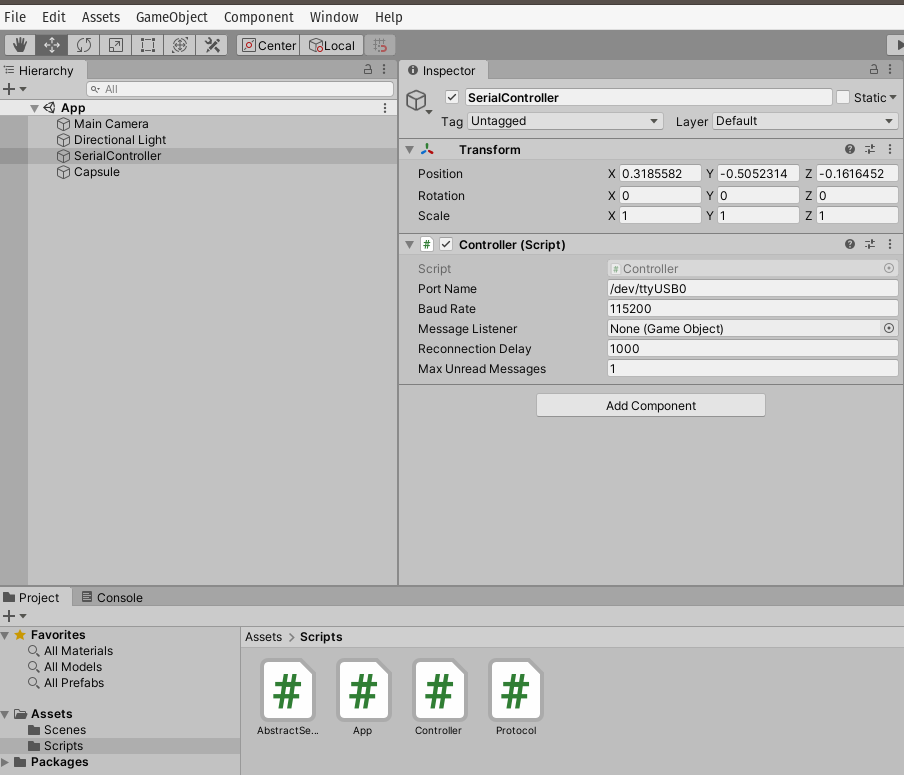
La configuración del proyecto queda como se muestra en la figura:
Sesión 1
En esta sesión vamos a experimentar con el controlador ESP32 y el bus SPI.
Ejercicio SPI
Realizaremos un ejercicio práctico para conectar un sensor a un controlador utilizando el puerto SPI. El sensor a utilizar será el BME280 de la empresa Bosh. El BME280 es un sensor ambiental que permite medir humedad relativa, presión y temperatura. Como controlador, vamos a utilizar el ESP32 y el framework de arduino.
Para realizar el ejercicio utilizaremos el siguiente material:
- API de arduino.
- Código fuente del módulo SPI del ESP32 Arduino Core.
- Información general del sensor BME280.
- Hoja de datos del sensor BME280.
- Tutorial del sensor BME280.
Pinouts
La siguiente figura muestra los pines del sensor a utilizar:
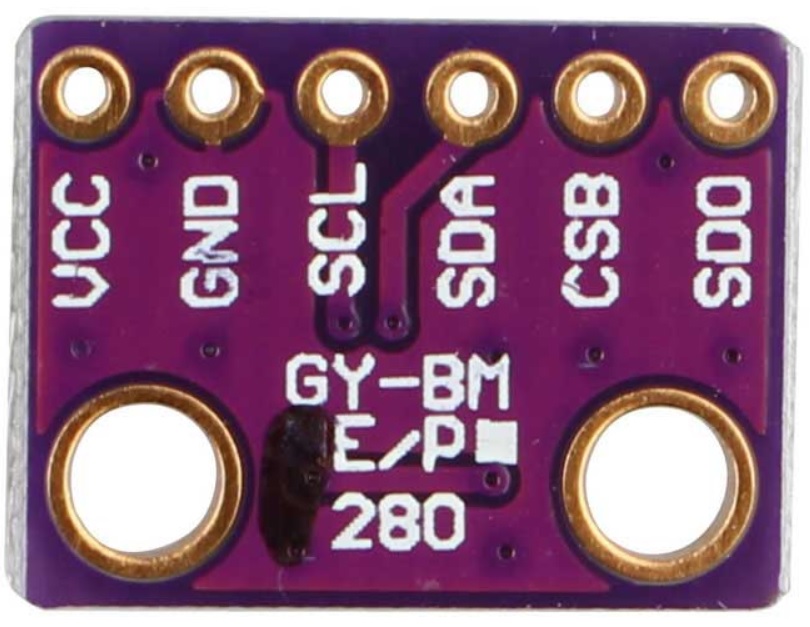
Las señales tienen la siguiente función:
- VCC: alimentación a 3.3V.
- GND: 0V.
- SCL: Clock SPI.
- SDA: MOSI SPI.
- CSB: CS o SS (Chip Select) SPI.
- SDO: MISO SPI.
En relación al controlador a utilizar, hay varias opciones:
Aquí se puede ver información de los pines SPI para el ESP32 pico:
- Clock SPI: pin 18
- MISO: pin 19
- MOSI: pin 23
- CS: pin 5
En este enlace se puede ver otro controlador.

Los controladores se puede comprar aquí:
Para conectar el sensor con el controlador se procede así:
| ESP32 pico | DevKit32 | BME280 | SPI |
|---|---|---|---|
| 3V3 | 3V3 | VCC | — |
| GND | GND | GND | — |
| pin 18 | SCK/18 | SCL | CLOCK |
| pin 23 | MOSI/23 | SDA | MOSI |
| pin 5 | SS/5/LED | CSB | SS |
| pin 19 | MISO/19 | SDO | MISO |
Software
Para realizar la prueba del sensor es necesario instalar estas dos bibliotecas:
Programa de prueba
Una vez instalada la biblioteca Adafruit BME280, se debe abrir el ejemplo BME280test.ino. Y realizar las siguiente modificaciones:
Comentar la el archivo de cabeceras Wire.h. Este archivo corresponde al API I2C. Modificar el pinout del SPI:
24 25 26 27 28 | #include <SPI.h>
#define BME_SCK 18
#define BME_MISO 19
#define BME_MOSI 23
#define BME_CS 5
|
Comentar la línea que declara el objeto I2C y descomentar la correspondiente a SPI:
33 34 35 | //Adafruit_BME280 bme; // I2C
Adafruit_BME280 bme(BME_CS); // hardware SPI
//Adafruit_BME280 bme(BME_CS, BME_MOSI, BME_MISO, BME_SCK); // software SPI
|
A continuación se observa el código completo:
1 2 3 4 5 6 7 8 9 10 11 12 13 14 15 16 17 18 19 20 21 22 23 24 25 26 27 28 29 30 31 32 33 34 35 36 37 38 39 40 41 42 43 44 45 46 47 48 49 50 51 52 53 54 55 56 57 58 59 60 61 62 63 64 65 66 67 68 69 70 71 72 73 74 75 76 77 78 79 80 81 82 83 84 85 86 | /***************************************************************************
This is a library for the BME280 humidity, temperature & pressure sensor
Designed specifically to work with the Adafruit BME280 Breakout
----> http://www.adafruit.com/products/2650
These sensors use I2C or SPI to communicate, 2 or 4 pins are required
to interface. The device's I2C address is either 0x76 or 0x77.
Adafruit invests time and resources providing this open source code,
please support Adafruit andopen-source hardware by purchasing products
from Adafruit!
Written by Limor Fried & Kevin Townsend for Adafruit Industries.
BSD license, all text above must be included in any redistribution
***************************************************************************/
//#include <Wire.h>
#include <Adafruit_Sensor.h>
#include <Adafruit_BME280.h>
 #include <SPI.h>
 #define BME_SCK 18
 #define BME_MISO 19
 #define BME_MOSI 23
 #define BME_CS 5
#define SEALEVELPRESSURE_HPA (1013.25)
 //Adafruit_BME280 bme; // I2C
 Adafruit_BME280 bme(BME_CS); // hardware SPI
 //Adafruit_BME280 bme(BME_CS, BME_MOSI, BME_MISO, BME_SCK); // software SPI
unsigned long delayTime;
void setup() {
Serial.begin(9600);
Serial.println(F("BME280 test"));
bool status;
// default settings
// (you can also pass in a Wire library object like &Wire2)
//status = bme.begin(0x76);ç
status = bme.begin();
if (!status) {
Serial.println("Could not find a valid BME280 sensor, check wiring!");
while (1);
}
Serial.println("-- Default Test --");
delayTime = 1000;
Serial.println();
}
void loop() {
printValues();
delay(delayTime);
}
void printValues() {
Serial.print("Temperature = ");
Serial.print(bme.readTemperature());
Serial.println(" *C");
Serial.print("Pressure = ");
Serial.print(bme.readPressure() / 100.0F);
Serial.println(" hPa");
Serial.print("Approx. Altitude = ");
Serial.print(bme.readAltitude(SEALEVELPRESSURE_HPA));
Serial.println(" m");
Serial.print("Humidity = ");
Serial.print(bme.readHumidity());
Serial.println(" %");
Serial.println();
}
|
Al ejecutar el código el resultado será algo similar a esto:
Temperature = 25.44 *C
Pressure = 850.51 hPa
Approx. Altitude = 1452.61 m
Humidity = 51.67 %S

Temperature = 25.43 *C
Pressure = 850.43 hPa
Approx. Altitude = 1453.42 m
Humidity = 51.67 %

Temperature = 25.43 *C
Pressure = 850.47 hPa
Approx. Altitude = 1453.03 m
Humidity = 51.67 %
La temperatura se reporta como un número en punto flotante en grados centígrados. La presión se reporta como un número en punto flotante en Pascales. Note que el valor de presión se divide por el literal 100.0F (constante en punto flotante) para convertir a hecto Pascales el resultado. Para el cálculo de la altitud aproximada, es necesario pasar la presión sobre el nivel del mar de la ciudad al día y hora de la prueba en unidades de hecto Pascales. Finalmente se reporta la humada relativa en punto flotante.
Análisis de la biblioteca SPI y la hoja de datos del sensor
Abra el código fuente de la biblioteca del sensor.
- Analice el código del constructor de la clase. ¿Qué estrategia utilizan para diferenciar el SPI por hardware al SPI por software?
- ¿En qué parte del código se inicializa el objeto SPI?
- Haciendo la lectura del código fuente, ¿Qué bit se envía primero, el de mayor peso o el de menor peso?
- ¿Cuál modo de SPI utiliza el sensor?
- ¿Cuál es la velocidad de comunicación?
- El sensor soporta dos modos SPI. Leyendo la información en la hoja de datos, cómo sería posible configurar el modo?
- ¿Cómo es el protocolo para escribir información en el sensor?
- ¿Cómo es el protocolo para leer información del sensor?
- Busque en el código fuente de la biblioteca, ¿Dónde se lee el chip-ID del sensor BME280?
- Muestre y explique detalladamente los pasos y el código para identificar el chip-ID. No olvide apoyarse de la hoja de datos
- ¿Qué otros pasos se requieren para inicializar el sensor?
Sesión 2
En esta sesión vamos a retomar el reto del parcial y lo vamos a combinar con el sensor que acabamos de estudiar. Se propone hacer lo siguiente:
- Realice una aplicación en Unity que muestre en la pantalla el valor de la presión, la temperatura y la humedad.
- La aplicación debe solicitar, con el byte 0x73, datos cada 100 ms.
- El protocolo será binario. En total se enviarán 12 bytes, 4 bytes para cada variable por ser un número en punto flotante. El orden de envío será | presión | temperatura | humedad |
¿Cómo conseguir cada uno de los bytes que componente la variable?
- Para responder esta pregunta investigue utilizando el CoolTerm.
- Considere de nuevo parte del código utilizado en el parcial:
1 2 3 4 5 6 7 8 9 10 11 12 13 14 15 | void setup() {
Serial.begin(115200);
}
void loop() {
static uint16_t x = 0;
if (Serial.available()) {
if (Serial.read() == 0x73) {
Serial.write((uint8_t)( x & 0x00FF ));
Serial.write( (uint8_t)(x >> 8 ));
}
}
}
|
Note cómo la operación (x >> 8 ) permite conseguir el byte de mayor peso del entero no signado de 16 bits x.
- Ahora intentemos la misma técnica para conseguir los bytes del float:
1 2 3 4 5 6 7 8 9 10 11 12 13 14 15 16 | void setup() {
Serial.begin(115200);
}
void loop() {
float num = 1.1;
if (Serial.available()) {
if (Serial.read() == 0x73) {
Serial.write((uint8_t)( num ));
Serial.write( (uint8_t)(num >> 8 ));
Serial.write( (uint8_t)(num >> 16 ));
Serial.write( (uint8_t)(num >> 32 ));
}
}
}
|
El 1.1 en punto flotante será el 3f 8c cc cd
- ¿Pudo compilar el programa?
Note que al intentar compilar, el compilador le dirá que no es posible aplicar el operador >> al tipo float.
- Debemos entonces aplicar una técnica diferente para obtener los bytes del float:
1 2 3 4 5 6 7 8 9 10 11 12 13 14 15 16 17 18 | void setup() {
Serial.begin(115200);
}
void loop() {
// 45 60 55 d5
// https://www.h-schmidt.net/FloatConverter/IEEE754.html
static float num = 3589.3645;
static uint8_t arr[4] = {0};
if(Serial.available()){
if(Serial.read() == 0x73){
memcpy(arr,(uint8_t *)&num,4);
Serial.write(arr,4);
}
}
}
|
En este caso estamos guardando los 4 bytes que componen el float en un arreglo, arr, para luego transmitir dicho arreglo.
- ¿En qué orden estamos transmitiendo los bytes, en bigEndian o en littleEndian?
- Para leer los datos en la aplicación en Unity necesitaremos hacer la acción opuesta, es decir, a partir de los 4 bytes debemos construir el número en punto flotante. Para hacerlo investigue esta clase de C#.
- En qué orden debemos organizar los bytes para poder hacer la conversión?